
Indeed Smart Screening allows employers to add an additional layer of candidate screening to jobs using Indeed Apply.
When paired with Augusta’s Indeed integration, candidates can complete Indeed’s Smart Screening experience and still flow directly into Augusta, where your existing qualification rules, hiring stages, interview scheduling, integrations, notes, statuses, and reporting continue as normal.
Quick Takeaway
To use Indeed Smart Screening with Augusta:
- Your Augusta Smart Posts must be connected through the Augusta x Indeed integration.
- You must enable Indeed Apply through your Augusta Indeed Settings.
- Work with your Indeed representative to purchase and configure Smart Screening for the jobs you want to use it on.
- Candidates complete their Indeed Apply application and Smart Screening experience.
- Their application still flows into Augusta, along with available Smart Screening information for your team to review.
Important: Enable Indeed Apply through your Augusta dashboard, not by modifying your Augusta-published jobs directly inside Indeed. Changes made directly to those jobs in Indeed can disconnect them from the Augusta integration.
Learn more: How to Turn On Indeed Apply in Augusta
What Is Indeed Smart Screening?
Indeed Smart Screening is an optional paid Indeed feature that evaluates applicants against criteria you configure for the job.
Depending on your Smart Screening setup, Indeed may provide information such as:
- A Smart Fit Score from 0–100
- An AI-generated candidate summary
- Candidate strengths or potential gaps
- Responses gathered through Indeed’s AI Recruiter
- Screening transcripts or other available screening details
- License or certification information collected through Indeed
Indeed describes Smart Screening as an additional way to help employers prioritize applicants and reduce the amount of manual resume review required.
Your hiring team still controls the final decision and can review candidates regardless of Indeed’s score or recommendation.
How Smart Screening Works with Augusta
Indeed and Augusta each provide different information within the same recruiting workflow.
| Stage | Where It Happens |
|---|---|
| Candidate finds your Augusta Smart Post | Indeed |
| Candidate completes the application | Indeed Apply |
| Indeed Smart Screening evaluates the candidate | Indeed |
| Available Smart Screening insights are sent into the candidate record | Indeed → Augusta |
| Augusta Qualification Rules screen the applicant | Augusta |
| Applicant appears in your Augusta dashboard | Augusta |
| Recruiter reviews Augusta + Indeed screening information | Augusta |
| Screening/interview scheduling | Augusta |
| Applicant statuses, notes & hiring stages | Augusta |
| Integrations & reporting | Augusta |
| Hiring disposition data sent back to Indeed | Augusta → Indeed |
The important distinction is that Indeed Smart Screening does not replace Augusta’s qualification process.
Augusta will still screen applicants using the Qualification Rules & Settings your agency has configured around your hiring needs.
Smart Screening simply gives your recruiters another source of information to consider when reviewing the candidate.
Before You Start
Make sure:
- Your Augusta Smart Posts are publishing through the Augusta x Indeed Integration.
- Indeed Apply is enabled through Augusta.
- You have spoken with your Indeed representative about purchasing and enabling Indeed Smart Screening.
Indeed notes that Smart Screening requires a compatible ATS connection or Indeed Apply setup. For Augusta customers, Indeed Apply through the Augusta integration is required for this workflow.
How to Enable Indeed Apply in Augusta
- Open your Augusta Dashboard.
- Go to Smart Posts.
- Select Indeed Settings.
- Toggle Opt-in to Indeed Apply ON.
- Click Save Indeed Settings.
Changes may take up to 24 hours to reflect on Indeed.
Once Indeed Apply is active, work with your Indeed representative to configure Smart Screening for the jobs where you want to use it.
Where Do I Review Smart Screening Results?
Once an applicant completes the Indeed Apply and Smart Screening process, the candidate will appear in your Augusta dashboard like any other Indeed Apply applicant.
Open the applicant’s Augusta profile to review the Smart Screening information provided by Indeed alongside the applicant information Augusta already collects.
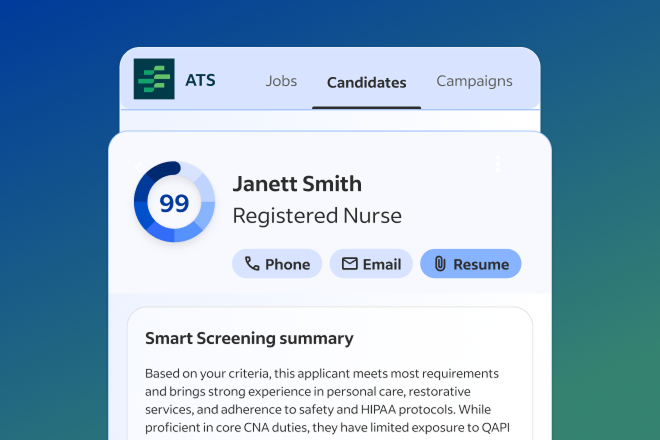
From there, continue processing the applicant through your normal Augusta workflow.
Use Smart Screening as Additional Context
Indeed Smart Screening can be especially helpful if you want additional information around areas such as:
- Certifications or licenses
- Experience
- Availability
- Skills
- Candidate responses beyond their resume
But you should still evaluate applicants based on your agency’s complete hiring needs.
Augusta Qualification Rules are designed around criteria your agency controls, including:
- Required Qualifications
- Flexible Qualifications
- Geo Qualification Rules
- Current and future staffing needs
This allows your team to combine Indeed’s additional screening insights with your Augusta recruiting workflow rather than having to choose one system or the other.
Keep Your Hiring Workflow in Augusta
Once the applicant enters Augusta, continue managing the hiring process there.
This keeps your team’s:
- Qualification results
- Candidate notes
- Statuses
- Screening and interview activity
- Hiring stages
- Orientations
- Integrations
- Reporting
- Hiring outcomes
in one place alongside applicants coming from your website, referrals, Google, community recruiting, and other sources.
Smart Screening should complement your recruiting strategy—not create a separate hiring workflow your team has to manage.
In Summary
Indeed Smart Screening and Augusta are not mutually exclusive.
If you use Indeed Apply through Augusta’s Indeed integration, you can add Indeed Smart Screening to eligible jobs while continuing to use Augusta for your complete applicant processing and hiring workflow.
Indeed can provide additional screening information and candidate insights. Augusta continues to provide the qualification criteria, scheduling, hiring stages, recruiter workflow, integrations, reporting, and centralized applicant history your agency uses across all recruiting sources.
Use the two together when Smart Screening provides additional value for your hiring team.
Comments
0 comments
Please sign in to leave a comment.